Friday, May 10, 2013
Post 15
I was so happy during this class to have some great discussions, demonstrations and explore new technology tools. It was wonderful to see my classmate use Google Drive and really see the power and advantage in using it. We even started Google Drive in our science class, confusing our professor by sending him links to our documents instead of attachments. At our district I still struggle to show some teachers how powerful and useful Google Apps can be. Many teachers are afraid to try and get scared off once technology doesn't work for them one time. As educators we cannot be afraid to fail and need to press ahead and try new tools that can be used to engage our students.

Friday, May 3, 2013
Post 14
In class we looked at two different sites: ePals Global Community and Persistent Issues in History Network.
I was mostly drawn to the ePals Global Community. I love the idea of finding a classroom or project to join other classes in a global community. There were many other librarians all over the country and world looking for others to pen-pal with. Partnering with another group from a different place could be a great opportunity for students to really get a global view of the world.
I also loved all the resources that were on the site. I especially like the Learning Centers: Global Citizens and In2Books Clubhouse. With student accounts that you can set up, they could explore all the different topics and activities on the site by themselves.
I was mostly drawn to the ePals Global Community. I love the idea of finding a classroom or project to join other classes in a global community. There were many other librarians all over the country and world looking for others to pen-pal with. Partnering with another group from a different place could be a great opportunity for students to really get a global view of the world.
I also loved all the resources that were on the site. I especially like the Learning Centers: Global Citizens and In2Books Clubhouse. With student accounts that you can set up, they could explore all the different topics and activities on the site by themselves.
Wednesday, May 1, 2013
Post 13
Active learning is a new term for me that came out of this chapter. Active learning requires that students be active in the pursuit of knowledge. This seems to be very close to the ideas behind using inquiry for the classroom as well. You want to engage the students and be partners in the pursuit of knowledge. I like the statement form the book, when students produce something the experiences are even more active. The assessment piece for students can be formal or informal on the task that the students are completing. I think that authentic and active learning should always be the goal.
Thursday, April 25, 2013
Post 12
Last night we had our multicultural night with eighth grade students from Fond Du Lac middle schools. I felt a bit badly for them since they had to get to know us and it was the end of the day and they seemed a bit worn out. Aida had a play a few games and I thought all of them could be applied in a classroom setting. I have played circle name games before but I thought adding the action verb to your name, while acting it out was a great touch. The Shape War went OK with the eighth grade students but I think it would have gone better with a bigger group. I liked the Elephant story and it reminded me of a picture book in my library with a similar slant. Looking at the rest of the agenda for the students it seems like a great opportunity to visit a university setting and learn something along the way.
Field Trip Take Two - Virtual
The virtual tour I explored was the Smithsonian National Museum of Natural History, Panoramic Virtual Tour. It can be found at: http://www.mnh.si.edu/panoramas/. As the site states, this virtual tour allows students using a desktop computer (Windows, Mac, Linux) or a mobile device (iPhone, iPad, Android) to take a virtual, self-guided, room-by-room walking tour of the whole museum. You can even browse a list of past exhibits, which is included on the ground floor map (see upper right map buttons). The visitor can navigate from room to room by clicking map locations or by following the blue arrows on the floor that connect the rooms. The desktop version is the best and includes numerous camera icons to indicate hot-spots where the visitor can get a close-up view of a particular object or exhibit panel.
From looking at other museum virtual tours I thought the best part about this virtual tour was the availability across different devices and the ability for the user to click on the camera icons for close up views. The quality of all the images and the panorama was exemplary. I also really liked the user-friendly navigation within the panoramic views of the museum. It was very easy to tell where you were within the museum as well as access the past exhibits. As a teacher I think I would use a scavenger hunt or some other assignment to give the exploration of this site some purpose and I wish there more of the captions to exhibits could be seen, but overall this was one of the best quality museum virtual tours I saw and I would recommend it to teachers.
Wednesday, April 17, 2013
Post 11
While I do love Google and Google Apps there can be things that are a bummer about the Google world. The slide show Google for Teachers mentioned using the Google Search Wonder Wheel. I loved the Wonder Wheel and I know a lot of school librarians would work it into their research lessons. But sadly Google got rid of the Wonder Wheel.
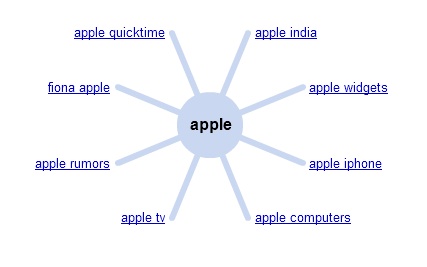 School librarians used to be able to teach students how to get to the advanced search setting while Google Searching with one click, not it takes two. Another bummer.
Our district uses Gmail and Google Apps for Education. This morning, seemingly random users could not access their Gmail. Of course this dispurpts our students' and staff's days. Last time this happened, I was able to find a useful site on Twitter: http://www.google.com/appsstatus. This site lets me know if Google is having issues with their apps and are working on it.
Our district uses Gmail and Google Apps for Education. This morning, seemingly random users could not access their Gmail. Of course this dispurpts our students' and staff's days. Last time this happened, I was able to find a useful site on Twitter: http://www.google.com/appsstatus. This site lets me know if Google is having issues with their apps and are working on it.
Thursday, April 11, 2013
Post 10
Since I love Google Apps for Education I got the chance to use Google Drawing with my TCH 602 lesson.
I think this would be a great tool to utilize for many social studies lessons. In my lesson we used Google Drawing to create time lines. The students loved being able to create their own timeline. With the Research tool we were able to easily insert applicable pictures. The app could also be used to create mind mapping tools.
Instructions to use Google Drawing can be found here: http://support.google.com/drive/bin/answer.py?hl=en&answer=179740
Great video tutorial: http://vimeo.com/50797313
With Google drawings you can easily create, share, and edit drawings online. Here are a few specific things you can do:
- Edit drawings online in real time with anyone you choose, and invite others to view your edits in real time.
- Chat with others who are editing your drawing, from within the drawings editor.
- Publish drawings online to the world as images, or download them in standard formats.
- Insert text, shapes, arrows, scribbles, and images from your hard drive or from the Web.
- Lay out drawings precisely with alignment guides, snap to grid, and auto distribution.
- Insert drawings into other Google documents, spreadsheets, or presentations using the web clipboard, then tweak them online.
Instructions to use Google Drawing can be found here: http://support.google.com/drive/bin/answer.py?hl=en&answer=179740
Great video tutorial: http://vimeo.com/50797313
Wednesday, April 3, 2013
Post 9
My lesson with Summer focused on Civics which I think can be very important for students to understand. It comes down to being aware of the world around you and how it works. Children as well as adults need to understand their rights and responsibilities as citizens. Many adults seem a bit clueless when it comes to civic topics. Students should be aware of how the government works. When I think of civics I think of role and purpose government but civics can also cover social issues. This could lead to some amazing discussions especially in the upper elementary and middle school grades. If a teacher decides to tackle social issues they need to make sure to set their personal opinion aside when preparing lessons and teaching. Our middle school science teacher does a unit on global warming but makes sure to covert both sides of the issue and lets students write persuasive essays about the causes of global warming. Even though this is a science class, the social issue of caring for our environment can be connected to civics.
Tuesday, March 26, 2013
Post 8
While thinking about multicultural education I was reminded of this video:
I remember watching this in my library science masters program and being reminded how blessed our American students are. The students in this video are eager to read, learn and must wait days or weeks for new books. The librarian rides for miles to bring the books to them and help with their homework. He see it as part of the fight for Columbia's future; the education of the future leaders.
While watching this video again this week, I found a happy update on the library he was in the process of building.
These videos show that with a quick Google search you can find multicultural education resources that would open students eyes.
While watching this video again this week, I found a happy update on the library he was in the process of building.
These videos show that with a quick Google search you can find multicultural education resources that would open students eyes.
Tuesday, March 19, 2013
Field Trip!
While in Madison, I took a trip to the Wisconsin Historical Museum http://historicalmuseum.wisconsinhistory.org/. The museum is located on Madison’s Capitol Square at 30 North Carroll Street. The museum has four floors each with different themes and exhibits. The fourth floor housed the newest “Wisconsin Innovators” exhibit and a community themed exhibit which showed more of the union and political past of Wisconsin. The third floor showed three different exhibits that all focused around Wisconsin history such as immigration, frontier Wisconsin, and everyday life. The second floor was completely focused on the Wisconsin Native Americans. The first floor had the museum store and a small coat and gathering area that had a small exhibit on Wisconsin beer history.
I thought the Wisconsin Historical Museum would be a wonderful place to bring students for a field trip especially for fourth graders who focus on Wisconsin and Native American history. The museum offers a variety of guided tours and further field trip information at their site: http://historicalmuseum.wisconsinhistory.org/FieldTrips/AboutFieldTrips.aspx. The three tours offered are: Native People of Wisconsin, Why History Matters, and What's the Big Idea? (for secondary students). As the site states the, “one-hour guided tours will challenge students to think critically about Wisconsin history and create personal connections to the past through Museum exhibits. Tour guides utilize the "Thinking Like a Historian" educational model, in which students are expected to actively participate by offering reactions and questions to their guide and classmates.” The site offered connections to educational standards documentation as well as preparing for your field trip and educational resources documentation. The cost is $4 per student and adult; the fee is free for school employees. There is also a reduced rate for schools with a 50% or greater economic disadvantage rate.
Wednesday, March 13, 2013
Post 7
While this is a social studies class I have technology on the brain. My district has been in the process of deciding what technology to commit to at each level. The middle school took the dive first to commit to iPads. The high school has been in many, many discussions over the whole year and has now decided to go 1:1 for students with Chromebooks. The 4th and 5th grade want carts of both to try. The conversations about which device is better is endless.
 After this week, when decisions were made, I now feel that it doesn't matter what device you choose as long as you are willing to try and transform what you are doing in the classroom.
This is a great article to read on this topic and better articulates how I feel: iPad or Chromebook: 4 Questions To Ask Before Choosing
This is a great article to read on this topic and better articulates how I feel: iPad or Chromebook: 4 Questions To Ask Before Choosing
Sunday, March 3, 2013
Post 6

In all three of our classes I am using Google Drive. I see this tool as incredibly useful especially in group work. Everyone on our program lives far away from each other. For partner and group work, if we needed to physically meet up as I used to with groups in my undergraduate work, it would be very inconvenient. With Google Drive we can work on our lesson plans or projects from home. We utilize chat and inserting comments to get our point across. We also are able to all edit the documents at the some time. I also use it to work on papers on my own. I am able to work on something at home and on my break at work or any other location. Instead of keeping track of a usb file drive, or emailing a document to myself, I know it will be accessible on my Google Drive.
The some potential we see for our own use it there for our future students. My school district decided to make the switch to Google email accounts and Google Apps for Education (GAFE) this year. I have already seen students sharing their documents with their teacher and working collaboratively on Google presentations in a group setting. One of the best aspects for students is that Google Drive automatically saves what you are working on and you have the option to revert to an old revision, you cannot lose your work! There are so many possibilities with GAFE that I would recommend to any school to make the switch.
Short Intro to GAFE
Long video on teaching history with Google Apps
Tuesday, February 26, 2013
Post 5
Much of the reading this week focused on standards. I know in my masters program, TCH program and my district much emphasis is placed on standards. I was glad this chapter offered some helpful strategies to teach with the standards in mind but to also do authentic teaching. The suggestions on page 93 were especially helpful.
- Understand the scope and nature of high-stakes testing
- I see educators get really worried and stressed out when there isn't a real reason to worry. If you are truly informed about testing then you should be able to tackle it and transfer that knowledge to your students.
- Weave test-like experiences into daily instruction in a seamless and productive manner.
- Again if you know the scope and nature of the test you should be able to prepare your students using daily instruction - not giving practice tests all the time but working with your everyday classroom to cover what you need.
- Correlate instructional plans with testing guides.
- I see these being used in my district. Students get used to how the test will look, the format, question type, etc. It helps ease the anxiety on test day. I do feel that it can be another drain on resources but test scores are how schools are measured in our current educational climate.
Tuesday, February 19, 2013
Post 4
Lots of things to think about this week. First off: I love Prezi. I heard about it during my masters program and first put it to use when I had to present during an interview for my current job (they must have liked it). My district superintendent also loves Prezi and using it during all of our district meetings and when he presents at conferences. Like Malia said in her video, I like to get away from using PowerPoint. Since everyone uses it, it can get boring, plus there are so many other options. For some reason I had never considered using the Explore part of Prezi. The Explore part is such a great way to get ideas or spark interest. It had also never occurred to me to use Prezi as a timeline tool, which it is perfect for. Pete and I are using the site Dipity for our lesson plan but I can see that Prezi would work for it as well.
Lots of information in the text and in the flipped videos on inquiry and Project Based Learning (PBL). This was well timed, I was just talking to a college about PBL. After showing him the site we are going to purchases the Starter Kit book to have in our library for staff and he is excited to start using it. Putting students first seems to be what inquiry and PBL is all about. Letting their own curiosity guide their learning will keep students engaged and them giving them something to do through PBL will engage them even more.
Lots of information in the text and in the flipped videos on inquiry and Project Based Learning (PBL). This was well timed, I was just talking to a college about PBL. After showing him the site we are going to purchases the Starter Kit book to have in our library for staff and he is excited to start using it. Putting students first seems to be what inquiry and PBL is all about. Letting their own curiosity guide their learning will keep students engaged and them giving them something to do through PBL will engage them even more.
Monday, February 11, 2013
Post 3
Chapter 2 focused on reflection. This was a big part of what I did during my first year as a school librarian and I still continue to do it as I teach during my second year. As a school librarian, I teach lessons to K-5 graders on library skills, study skills, technology skills, basically anything that will help you find the information that I am looking for. I also do some read-a-loud for reading promotion and reading/language skills.
When I started my first year I decided I needed to keep track of what I was teaching so I could remember to do it again (or not) the following years. I have developed a huge Google Drive spreadsheet which tracks how my lessons went. I track each grade by the week I am teaching, with sections for the lesson and my feedback on the lesson. Over the first year I could easily start to see that some of my lessons were keepers and some were not. I made notes for myself to focus on certain things or present them in a certain way that was more successful. Much of this type of reflection in my spreadsheet was reflection after the lesson. These reflections have been very valuable to me this year and allows me to plan my lessons with more ease.
I also reflect during teaching. Since I see four sections of each grade I do my lessons several times. I feel bad for the ones who go first! I know that I keep getting better at the lesson the longer I teach it. Some things don't work and I scrap them before the next class comes in, something else works great and then I focus on it for the next class. Poor first ones!
When I started my first year I decided I needed to keep track of what I was teaching so I could remember to do it again (or not) the following years. I have developed a huge Google Drive spreadsheet which tracks how my lessons went. I track each grade by the week I am teaching, with sections for the lesson and my feedback on the lesson. Over the first year I could easily start to see that some of my lessons were keepers and some were not. I made notes for myself to focus on certain things or present them in a certain way that was more successful. Much of this type of reflection in my spreadsheet was reflection after the lesson. These reflections have been very valuable to me this year and allows me to plan my lessons with more ease.
I also reflect during teaching. Since I see four sections of each grade I do my lessons several times. I feel bad for the ones who go first! I know that I keep getting better at the lesson the longer I teach it. Some things don't work and I scrap them before the next class comes in, something else works great and then I focus on it for the next class. Poor first ones!
Wednesday, January 30, 2013
Post 2
Our reading in Chapter 14 in the Lee textbook toughed on something that I feel strongly about: not using technology just to use technology. As much as I love to get teachers into using technology, the technology has to be used as a means to achieve an educational goal. There are lots of good uses of technology (I've seen amazing things), but there are bad uses as well. The book lays out three items to consider - your technology should fit at least one of these:
REPLACE
make old practice obsolete (i.e. handouts, calculators...)
ENHANCE
make better practices we already do (i.e. Interactive textbooks, email communication...)
INNOVATE
do what we were never able to do before (i.e. back channel during videos/presentations, student driven differentiation...)
- The technology should improve student' opportunities to learn
- The technology should create new learning opportunities that would not otherwise be available.
- The technology should enhance the learning experience by motivation or encouraging students to learn.
I like all of these items and I think they all can apply to some situations. In my district we think about technology being able to Replace, Enhance, or Innovate (REI) what you are teaching.
make old practice obsolete (i.e. handouts, calculators...)
ENHANCE
make better practices we already do (i.e. Interactive textbooks, email communication...)
INNOVATE
do what we were never able to do before (i.e. back channel during videos/presentations, student driven differentiation...)
Thursday, January 24, 2013
Post 1
While I did graduate with a minor in history, I still feel that I would be unprepared to teach social studies to students right now. When I leave this class I hope to have a better grasp on the social studies curriculum that each grade level is required to cover. Since I work as a school librarian, I feel this knowledge would help me to better serve the students and staff.
I have been interested in the idea of a flipped classroom and even worked to become Flipped Classroom Certified on Sophia.org. The ability for teacher to flip the classroom, students take in the content on their own and move the work to the classroom, just seems to make sense. Along with another teacher, I have been trying to move some of our school technology help into a flipped model. I am excited to try the model as the student.
I love using all this technology!

I have been interested in the idea of a flipped classroom and even worked to become Flipped Classroom Certified on Sophia.org. The ability for teacher to flip the classroom, students take in the content on their own and move the work to the classroom, just seems to make sense. Along with another teacher, I have been trying to move some of our school technology help into a flipped model. I am excited to try the model as the student.
I love using all this technology!
Subscribe to:
Comments (Atom)